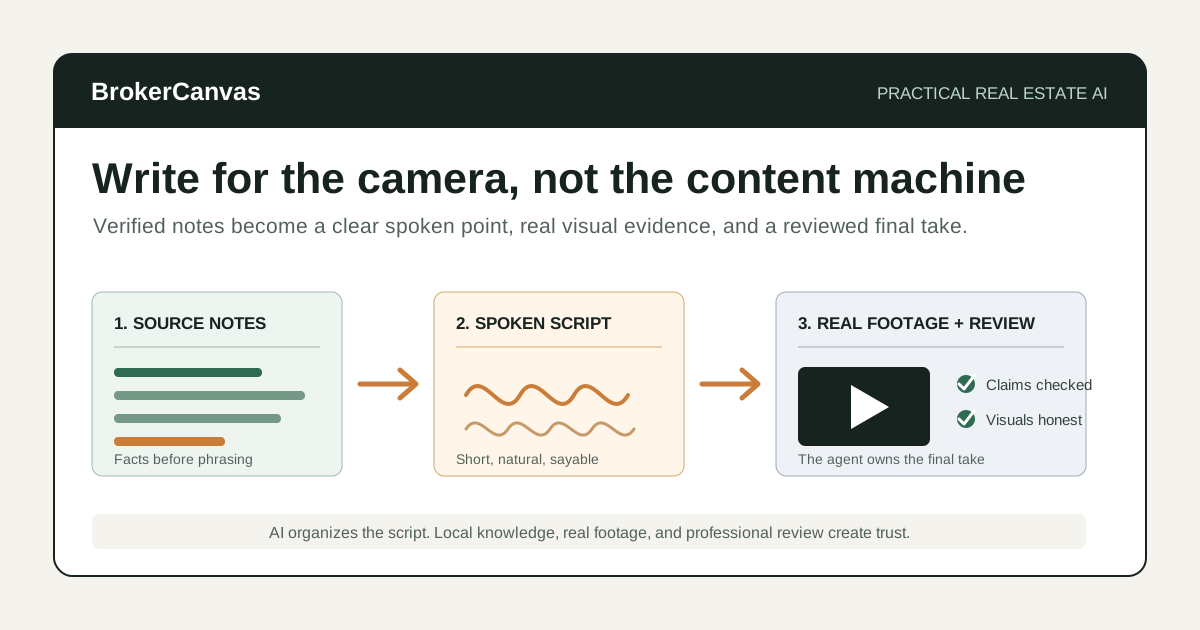
Most real estate video problems start before the camera turns on.
The agent has a useful idea, but the opening takes too long. The property walkthrough becomes a list of features. The market update sounds like a report being read aloud. The third take gets stiffer than the first because the script was written for a webpage instead of a person.
AI real estate video scripts can help organize the message, tighten the opening, and turn rough notes into something easier to say. The useful role is preparation.
AI should not invent property facts, manufacture market urgency, create a fake testimonial, or turn a synthetic version of the property into the main evidence.
My rule is simple: use AI to make the point clearer, not to make the video feel less real.
The Right Way to Think About AI Video Scripts
A video script is not a blog post with shorter paragraphs.
Spoken language needs a cleaner rhythm. Sentences should be shorter. The viewer needs to understand the point before deciding whether to keep watching. The script should also leave room for the agent's natural phrasing, pauses, examples, and judgment.
AI is good at structure. It can take a pile of notes and create a beginning, middle, and end. It can provide three opening options, shorten an explanation, or adapt one idea for a listing walkthrough, email video, and social clip.
The agent still needs to decide what matters, verify every claim, and make the final wording sound like something they would actually say.
Video Types Worth Scripting
Not every video needs a full teleprompter script. Many only need a clear outline.
AI can help prepare:
- listing introduction videos
- property walkthrough voiceovers
- seller preparation videos
- buyer education videos
- market update videos
- neighborhood or local-business videos
- open house promotion
- FAQ and objection-answer videos
- email video follow-up
- short-form social clips
The best format depends on the job. A listing video should help the buyer understand the property. A market update should explain one useful change. A seller FAQ should answer one real concern. Trying to cover everything usually produces a video nobody finishes.
What AI Should Not Put in a Real Estate Video
Video can make weak claims feel more believable because viewers hear and see a person delivering them. That makes review more important, not less.
Do not let AI:
- invent property features, dimensions, updates, views, proximity claims, or neighborhood details
- make unsupported school, crime, safety, demographic, or protected-class statements
- call a room a bedroom, office, finished area, or permitted improvement without verification
- promise price, demand, appreciation, offer activity, sale timing, or investment performance
- create fake client quotes, testimonials, reviews, or transaction outcomes
- hide defects or materially change the property through synthetic footage or images
- imitate another person's voice, likeness, endorsement, or identity without permission
- give legal, tax, lending, appraisal, inspection, insurance, title, or investment advice
If the video includes AI-edited, AI-staged, or synthetic visuals, review MLS, brokerage, advertising, platform, and local disclosure requirements. Keep the current condition of the property clear.
If the workflow turns listing photos into motion, use the separate AI real estate listing video workflow to distinguish source-frame movement from generated frames, choose when real footage is needed, audit every transition, and review rights, disclosure, exports, and publishing evidence.
I would rather publish a simple video with real footage than a polished synthetic tour that creates doubt at the showing.
A Practical AI-Assisted Video Script Workflow
Step 1: Give the video one job
Write one sentence before opening an AI tool:
After watching this video, the viewer should understand ________.
Examples:
- why the main-level layout works well for daily life
- what sellers should prepare before listing this month
- why buyers should separate payment questions from purchase-price questions
- what changed in local inventory and what it does not mean
- how to compare a renovated home with a lower-priced home that needs work
If the blank needs three paragraphs, the video probably has more than one job.
Step 2: Build a verified source sheet
The quality of the script depends on the quality of the notes.
For a listing video, collect:
- verified property facts
- seller-approved updates and documentation
- the strongest layout or use-case observations
- features the footage will actually show
- claims that should be avoided
- required brokerage or advertising language
- the next step for an interested buyer
For a market video, collect the date, data source, market area, period being compared, the one change worth explaining, uncertainty, and the practical takeaway.
Do not ask AI to fill the gaps. Mark missing information and verify it before recording.
Step 3: Choose the format and length
Format changes the writing.
- 15 to 30 seconds: one idea, one proof point, one next step.
- 45 to 90 seconds: a clear opening, two or three useful points, and a short close.
- Two to four minutes: a deeper explanation with examples, transitions, and visual cues.
- Property walkthrough: a scene-by-scene outline tied to actual footage.
A short video is not a long script read faster. Cut the number of ideas.
Step 4: Draft the spoken outline first
I would not ask for the polished script first.
Ask AI for:
- the core point
- three opening options
- the two or three supporting points
- the proof or example behind each point
- the next step
Review the outline. Remove generic claims. Reorder the points based on what a viewer needs first. Then ask for the spoken draft.
Step 5: Rewrite for your actual voice
Read the script aloud once.
Circle anything you would never say in a client conversation. Common problems include:
- long formal transitions
- overuse of adjectives
- generic openings such as "Are you ready to discover..."
- claims that sound more certain when spoken
- sentences that require one breath too many
- a call to action that sounds like an advertisement
Replace those lines with your normal language. Contractions are fine. Short fragments are fine. The script needs to sound credible out loud, not impressive on the page.
Step 6: Add visual cues without fabricating footage
A useful script says what the viewer should see.
For example:
[show kitchen-to-living-room sightline][cut to backyard depth from patio][display verified inventory chart][show original vacant room, then labeled staged concept]
Visual cues keep the spoken track connected to evidence. Do not use synthetic footage to show a feature, renovation, view, or condition that does not exist.
Step 7: Run a claim and compliance review
Before recording, check every factual sentence.
Ask:
- What is the source?
- Is the information current?
- Does the footage support the claim?
- Could the language create a fair housing concern?
- Does an edited visual need disclosure?
- Does the brokerage require specific identification or advertising language?
- Would I be comfortable explaining this line to the seller, buyer, broker, or MLS?
This review is the difference between using AI for preparation and letting AI publish on your behalf.
Step 8: Record in sections and keep the natural take
You do not need to memorize a 90-second script perfectly.
Record the opening, main points, and close separately. Use the script as a rail, not a performance test. If the second take is technically cleaner but the first sounds more like you, I would usually keep the first.
The goal is clear communication, not removing every human pause.
Example Prompt: Write a Real Estate Video Script
Use verified source notes and remove private information the tool does not need.
You are helping a real estate agent prepare an on-camera video script.

Video job:
[what the viewer should understand after watching]

Video type:
[listing introduction / property walkthrough / market update / buyer education / seller FAQ / open house / local guide / social clip]

Audience:
[specific audience]

Target length:
[15-30 seconds / 45-90 seconds / 2-4 minutes]

Verified source notes:
[paste notes]

Facts or claims to avoid:
[list]

Required disclosures or brokerage language:
[list]

My normal speaking style:
- Direct and calm
- Short sentences
- Practical, not salesy
- No exaggerated adjectives
- No generic hooks

Guardrails:
- Use only the verified source notes.
- Do not invent property, neighborhood, school, market, client, pricing, or transaction facts.
- Do not make fair housing-sensitive, safety, crime, demographic, appreciation, demand, or outcome claims.
- Do not provide legal, tax, lending, appraisal, inspection, insurance, title, or investment advice.
- Do not create fake testimonials or endorsements.
- Mark any missing information as a verification item.
- Keep AI-edited or synthetic visual suggestions clearly labeled.

Create:
1. The single core point.
2. Three opening options that do not sound clickbait-heavy.
3. A spoken outline.
4. A complete script at the requested length.
5. Visual cues tied only to real footage, verified charts, or clearly labeled concepts.
6. A short, low-pressure call to action.
7. A claim-verification checklist.
8. Lines that may sound unnatural when spoken.
Example Prompt: Turn One Video Into Shorter Formats
Start with an approved script. Repurposing should preserve the facts and point of view, not generate a new set of claims.
Repurpose this approved real estate video script into smaller content assets.

Approved script:
[paste final reviewed script]

Rules:
- Preserve the verified facts and original meaning.
- Do not add claims, statistics, property details, urgency, or promises.
- Keep the tone calm, practical, and human.
- Do not use generic motivational language.
- Do not turn nuanced cautions into absolute claims.

Create:
1. A 20-second short-form version.
2. A caption under 150 words.
3. An email introduction that links to the video.
4. Three title options.
5. A plain thumbnail phrase under six words.
6. A follow-up question for comments or replies.
7. A list of facts that must remain unchanged.Four Real Estate Video Script Structures
1. Listing video: context before features
Opening: Name the property decision or experience the home helps with.
Middle: Show two or three verified features that support that point.
Close: Invite the viewer to review the full listing or schedule a showing.
Weak: "Welcome to this stunning home with amazing finishes."
Stronger: "The useful thing about this home is how the kitchen, living room, and covered patio work as one everyday space."
2. Market update: one change and one implication
Opening: State what changed and the time period.
Middle: Explain what the data may mean and what it does not prove.
Close: Offer a buyer- or seller-specific review.
The AI market update scripts by audience provides deeper examples for sellers, buyers, past clients, and investors.
3. Buyer education: answer the next question
Opening: Use a real buyer question.
Middle: Explain the distinction or process in plain language.
Close: Name the professional or next step that can provide client-specific guidance.
Use the buyer education workflow when the same topic also needs an email sequence.
4. Seller FAQ: explain the tradeoff
Opening: State the seller concern without making it sound foolish.
Middle: Explain the options and tradeoffs.
Close: Invite a property-specific conversation rather than promising an outcome.
The seller objection script guide is the companion workflow for harder listing conversations.
How to Keep AI Video Content From Sounding Generic
The script needs material AI cannot invent responsibly.
Add:
- a real question from a recent client conversation
- a verified property detail visible in the footage
- a local market pattern with a named source and date
- a tradeoff you regularly explain
- a short example from your process
- a sentence you would naturally say to a client
Remove:
- "dream home"
- "game-changing"
- "you do not want to miss this"
- "the market is on fire"
- "perfect for families"
- "something for everyone"
- any hook that promises more than the video delivers
Your voice does not come from telling AI to "sound authentic." It comes from giving it real observations, then editing the result with your own judgment.
Where This Fits in a Real Estate Content System
A useful video should connect to the rest of the workflow.
Use the real estate AI content calendar to choose topics from actual business priorities. Use the AI listing descriptions workflow to keep listing video and listing copy aligned. Use the local SEO content workflow when a video supports a neighborhood or market page.
If the video uses staged, enhanced, or AI-generated property visuals, review the AI virtual staging disclosure guide and the real estate AI compliance checklist.
The finished video can become an email, short social clip, listing-page asset, seller resource, or training example. Repurpose the verified idea. Do not create five new claims just because the format changed.
Real Estate Video Script Review Checklist
Before recording or publishing, check:
- Does the video have one clear job?
- Can every property or market fact be traced to a source?
- Does the footage support what the script says?
- Were missing details verified rather than invented?
- Does the language avoid fair housing and protected-class concerns?
- Are edited, staged, or synthetic visuals labeled when required or helpful?
- Does any line sound like legal, lending, appraisal, inspection, tax, insurance, title, or investment advice?
- Does the script promise an outcome or create false urgency?
- Would the agent actually say these words?
- Is the call to action useful and proportionate?
If the script is polished but difficult to say, keep editing.
The Best First Step
Start with one 45-second answer to a question you heard this week.
Write five verified bullet points. Ask AI for three openings and a spoken outline. Draft the script, read it aloud, cut every line that does not sound like you, and record it in sections.
Do not start with an AI avatar, synthetic property tour, or complicated production stack. Start with a useful point and a real person explaining it clearly.
Final Takeaway
AI can help real estate agents write clearer video scripts, organize verified notes, improve openings, and repurpose useful ideas.
It cannot supply local credibility, verify property facts, replace professional judgment, or make synthetic media trustworthy by itself.
The practical workflow is straightforward: choose one job, build the source sheet, draft for speech, add real visual evidence, review every claim, and keep the final take human.