Relocation clients are not just ordinary buyers or sellers with a longer drive.
They may be coordinating a job start, a home sale in another market, temporary housing, school or childcare decisions, travel, movers, financing, remote showings, and a closing date that affects the rest of the move.
The information arrives in pieces. One detail is in an email from the employer. Another is in a text about the current home. Property questions are mixed with travel plans. A spouse or partner may join halfway through the search with a different set of priorities.
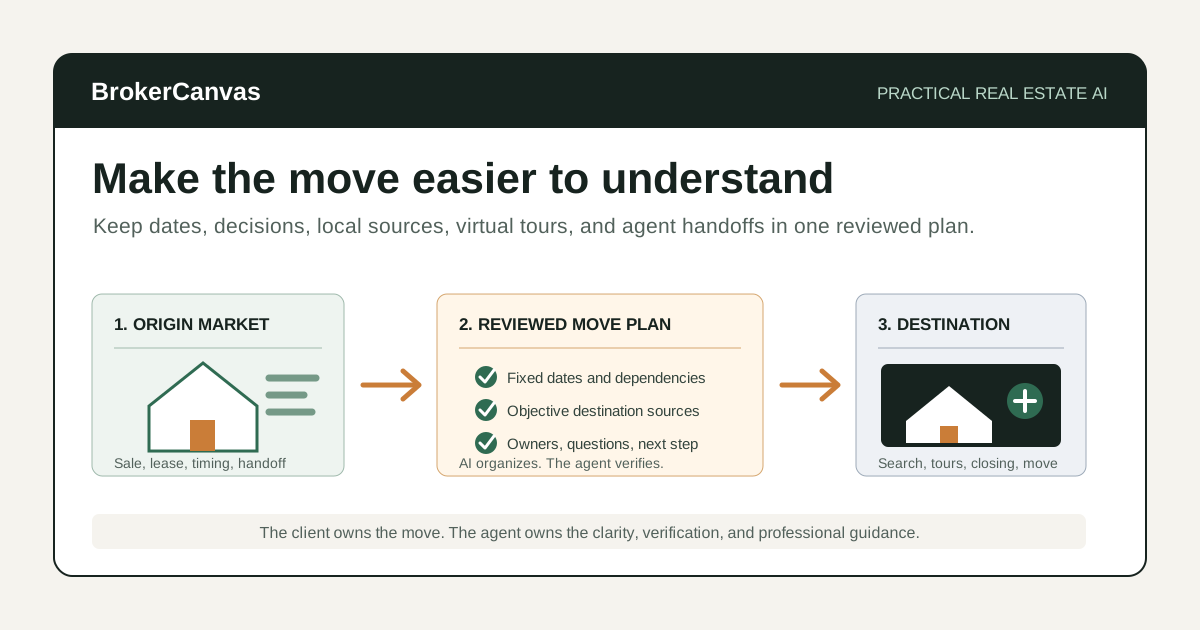
An AI relocation workflow for real estate agents can help organize those moving parts, prepare better questions, create clearer recaps, and keep the next decision visible.
It should not choose a neighborhood, make school or safety judgments, predict commute times without a source, or replace the local and professional guidance the client needs.
My rule is simple: use AI to reduce relocation confusion, not to pretend the move is simpler than it is.
Why Relocation Needs Its Own Workflow
A local buyer can often adjust one variable at a time. A relocation client may have several deadlines moving together.
The real estate plan may depend on:
- employment start or transfer dates
- the sale or lease end date in the current market
- financing and funds from another property
- travel windows for in-person tours
- temporary housing availability
- moving-company timing
- closing and possession coordination
- family, caregiving, accessibility, or pet logistics the client chooses to share
A useful workflow makes those dependencies visible. It does not force every client into the same timeline.
I would rather show a client three honest timeline scenarios than give them one clean plan built on assumptions.
Where AI Can Help With Relocation Clients
AI is useful for organizing approved information and preparing communication.
It can help an agent:
- turn intake notes into a relocation brief
- separate fixed deadlines from flexible preferences
- identify missing questions before the search begins
- build a move timeline with dependencies and owners
- prepare a factual local-resource packet
- create consistent virtual-showing notes
- compare homes against the client’s stated priorities
- draft post-tour recaps for multiple decision-makers
- coordinate the handoff between referring and destination agents
- maintain a clear next-action list through closing and the move
The useful role is synthesis. AI can help keep the moving parts in one structure. The agent still verifies the information, guides the process, and owns every client-facing recommendation.
What AI Should Not Do in a Relocation Workflow
Relocation work can create fair housing, privacy, agency, referral, advertising, and professional-boundary risks.
Do not ask AI to:
- recommend where a client should live based on race, color, religion, sex, disability, familial status, national origin, or another protected characteristic
- label neighborhoods as safe, good, bad, family-friendly, exclusive, desirable, or appropriate for a type of person
- rank schools, crime, demographics, politics, religion, or community makeup for the client
- invent commute times, taxes, insurance costs, HOA rules, zoning, amenities, development plans, or local services
- infer private facts from a client’s employer, name, family, disability, finances, or online activity
- decide whether a client should buy, rent, sell, commute, waive a contingency, or choose a property
- give legal, tax, lending, appraisal, inspection, insurance, title, immigration, employment, or moving-contract advice
- share client details across agents or vendors without appropriate permission
Provide objective sources and let clients evaluate personal fit for themselves. Follow brokerage, fair housing, agency, referral, privacy, advertising, MLS, and local requirements.
A Practical AI-Assisted Relocation Workflow
Step 1: Build the relocation brief
Start with one structured intake instead of a loose collection of messages.
Capture only information needed for the work:
- origin and destination markets
- reason for the move, if the client chooses to share it
- fixed dates and flexible dates
- current housing status
- purchase, rental, or sale needs
- financing or lender status
- property requirements and tradeoffs
- travel availability
- remote decision-makers who should be included
- communication preferences
- questions requiring another professional
Keep requirements in the client’s own language. “Needs a room with a door for confidential calls” is more useful than automatically labeling the requirement “home office.”
Step 2: Separate deadlines, dependencies, and preferences
Not every date has the same weight.
- Deadline: a date that materially affects the move.
- Dependency: an action that must happen before another action can proceed.
- Preference: a desired outcome that may remain flexible.
- Unknown: information that still needs verification.
For example, an employment start date may be fixed. A preferred closing date may depend on the current home sale. A two-week overlap may be desirable but not required.
AI can organize the categories. It should not silently turn a preference into a deadline.
Step 3: Create three realistic timeline scenarios
I would usually prepare:
- Direct move: current housing and destination housing align closely.
- Overlap: the client carries or controls both homes for a period.
- Bridge plan: temporary housing or another interim arrangement separates the transactions.
Each scenario should show assumptions, open questions, decision dates, owners, and professionals to consult. Do not present tax, financing, lease, insurance, or legal conclusions as real estate advice.
Step 4: Build a factual destination packet
A relocation packet should help the client research, not tell the client what to prefer.
Useful sections may include:
- official municipal and county resources
- objective maps and geographic boundaries
- public transportation and road information
- utility-provider and service links
- official school-district boundary and state information sources
- public tax and assessment resources
- airport, healthcare, library, parks, and government links
- property types, market observations, and inventory from verified sources
- questions the client may want to investigate independently
Link to the source and date the information. Avoid summaries that become subjective neighborhood recommendations.
Use the local SEO content workflow when building durable, source-backed local resources on your website.
Step 5: Prepare the search around tradeoffs
A remote client can lose time reviewing homes that technically match the filters but fail the actual move.
Organize priorities into:
- must work on day one
- strong preference
- can be changed later
- requires professional verification
- unknown until an in-person visit
Use the AI buyer consultation prep workflow to establish the search. If the client is selling before moving, keep the destination timeline connected to the current-home plan rather than treating them as separate projects.
Step 6: Standardize virtual showings
A virtual showing should be more than a fast video call through the best-looking rooms.
I do not think a virtual tour should feel polished at the expense of being useful. Show the awkward transition, the road behind the fence, and the storage area the listing photos skipped.
Use the same capture structure for every property:
- street and exterior context visible from the property
- entry sequence and room connections
- ceiling height, light, noise, and sightline observations
- storage, mechanical areas, parking, access, and outdoor space
- visible condition items that require professional review
- listing facts that still need verification
- questions for the listing agent
- what cannot be evaluated remotely
Do not hide awkward transitions, road noise, condition concerns, or camera limitations. The purpose is to reduce uncertainty, not produce a property commercial.
Step 7: Create a property comparison after each tour block
Remote buyers can experience the same memory problem as local buyers, with less physical context.
Use the AI property comparison workflow to separate verified facts, observations, reactions, and unknowns. Preserve the client’s own priorities and do not ask AI to choose a winner.
The comparison should end with a verification list and the next decision: remove, revisit, investigate, tour in person, or discuss an offer with appropriate agent and professional guidance.
Step 8: Send a decision recap
After a virtual tour, strategy call, or timeline change, send a short recap.
Include:
- what was decided
- what remains open
- facts or documents to verify
- tasks, owners, and dates
- the next scheduled conversation
The client meeting recap workflow is useful here. A relocation recap should also show whether a decision affects travel, temporary housing, the origin-market transaction, or the moving plan.
Step 9: Coordinate the cross-market handoff
If two agents are involved, define ownership early.
With client permission, document:
- who owns the origin-market work
- who owns the destination-market work
- how and when updates will be shared
- what client information may be shared
- referral documentation and brokerage requirements
- transaction dependencies between markets
- who communicates a delay or material change
The client should not have to reconcile two competing timelines or repeat the same update to everyone.
Step 10: Move the final plan into transaction coordination
Once the client is under contract, transfer the verified dates, dependencies, contacts, and open questions into the AI transaction coordination checklist.
Keep moving logistics separate from contract obligations. Movers, utilities, travel, and temporary housing matter, but they should not obscure financing, inspection, appraisal, title, insurance, closing, and possession milestones.
Example Prompt: Build a Relocation Client Plan
Remove personal information the tool does not need and use only systems your brokerage permits.
You are helping a real estate agent organize a relocation client plan.

Role:
Act as an information-organizing assistant. Create a clear timeline, question list, and communication plan. Do not choose a location or property for the client.

Relocation brief:
- Origin market:
- Destination market:
- Fixed dates:
- Flexible dates:
- Current housing status:
- Destination housing goal:
- Financing or lender status:
- Travel windows:
- Property must-haves:
- Strong preferences:
- Items that can change later:
- Remote decision-makers:
- Communication preferences:
- Known professional contacts:
- Open questions:

Guardrails:
- Use only the information provided.
- Keep deadlines, dependencies, preferences, assumptions, and unknowns separate.
- Do not recommend neighborhoods based on protected characteristics.
- Do not make school, crime, safety, demographic, commute, tax, insurance, appreciation, or outcome claims.
- Do not invent property, market, employer, moving, or local facts.
- Do not provide legal, tax, lending, appraisal, inspection, insurance, title, immigration, employment, or moving-contract advice.
- Mark anything requiring verification.
- Do not share information beyond the people authorized by the client.

Create:
1. A concise relocation brief.
2. A timeline of fixed dates and dependencies.
3. Direct-move, overlap, and bridge-plan scenarios with assumptions.
4. Questions for the client.
5. Questions for the lender, origin agent, destination agent, attorney, insurer, mover, employer, or another appropriate professional.
6. A destination research checklist using objective sources.
7. A communication cadence through the next decision.
8. A task list with owner and target date.
9. A list of privacy, fair housing, agency, and brokerage review items.
Example Prompt: Prepare a Virtual Showing Recap
Use your reviewed showing notes and listing materials. Do not ask AI to fill in what the camera missed.
Organize this virtual property showing into a neutral client recap.

Client priorities:
[paste]

Verified listing facts:
[paste]

Agent observations:
[paste]

Client reactions:
[paste]

Items not visible or not verified:
[paste]

Questions for the listing agent or another professional:
[paste]

Rules:
- Keep verified facts, observations, client reactions, and unknowns separate.
- Do not make neighborhood, school, crime, safety, demographic, value, condition, financing, legal, tax, insurance, title, or investment conclusions.
- Do not recommend that the client buy or reject the property.
- Do not turn a camera limitation into a positive or negative property claim.
- Preserve uncertainty and identify the next verification step.

Create:
1. A property summary tied to the client’s stated priorities.
2. Apparent strengths and tradeoffs.
3. What cannot be evaluated remotely.
4. Questions and verification tasks.
5. A short client email recap.
6. A CRM note.
7. The next decision options without recommending one.What to Include in a Relocation Client Packet
A useful packet is short enough to navigate and specific enough to reduce repeated questions.
Move overview
Show the current timeline, assumptions, open decisions, and next conversation. Do not bury the plan under local marketing copy.
Destination research links
Provide objective, primary sources where possible. Label the source and access date. Let clients investigate subjective fit independently.
Search and showing process
Explain how properties will be screened, how virtual showings work, what the camera cannot establish, and when an in-person visit may be appropriate.
Professional contact map
List the role of each agent and relevant lender, attorney, title, inspection, insurance, tax, moving, or other professional. Avoid implying that a referral is a guarantee of service or outcome.
Decision and communication log
Keep approved recaps, decisions, open questions, and next actions in one place. The client should be able to see what changed and why.
Relocation Workflow Review Checklist
Before sending an AI-assisted plan or recap, check:
- Are the client’s fixed dates, preferences, and unknowns separated?
- Are all local, property, and timeline claims traceable to a source?
- Does the material avoid steering, protected-class, school-quality, crime, safety, and demographic judgments?
- Are commute, tax, insurance, HOA, utility, and service details sourced and qualified?
- Does the plan avoid legal, lending, appraisal, inspection, tax, insurance, title, immigration, employment, and moving-contract advice?
- Does the virtual-showing recap state what could not be evaluated?
- Has the client authorized information sharing across agents and vendors?
- Are agency, referral, and brokerage requirements documented?
- Does every open item have an owner or verification step?
- Does the communication sound like something you would actually send?
If the plan is polished but hides assumptions, it is not ready.
The Best First Step
Start with the next relocation consultation.
Build one brief with fixed dates, dependencies, preferences, and unknowns. Create three timeline scenarios. Then send a one-page recap that names the next decision and who owns each open item.
Do not start by generating a 30-page neighborhood guide. Start by making the move easier to understand.
Final Takeaway
AI can help real estate agents organize relocation timelines, prepare objective destination resources, standardize virtual showings, coordinate cross-market handoffs, and communicate the next step clearly.
It cannot decide where a client belongs, verify local facts by itself, replace professional advice, or remove the uncertainty from a complicated move.
The practical role is narrower and more valuable: keep the facts, decisions, owners, and dependencies visible so the client can move forward with fewer surprises.