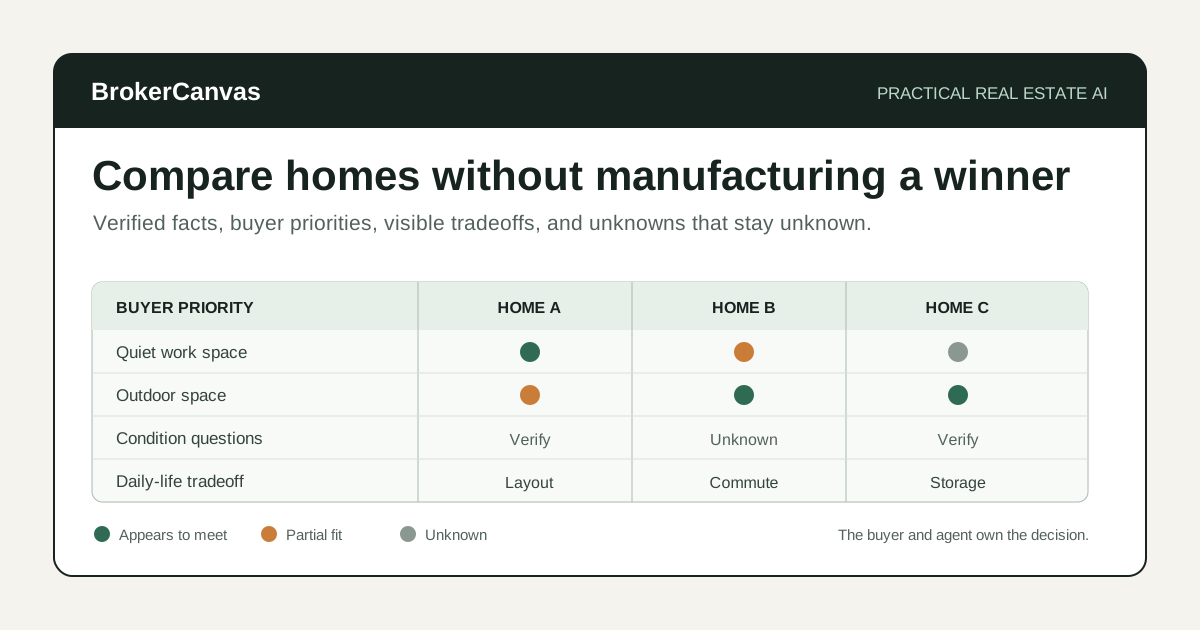
After three or four showings, homes start blending together.
The buyer remembers the kitchen from one property, the backyard from another, and the uncomfortable upstairs layout from a third. Photos help, but they do not capture the sound from the road, the condition concerns, the storage problem, or the way the buyer reacted in the room.
The agent usually has the same problem in a different form: notes in the CRM, comments in a text thread, listing sheets in an email, and a few important observations that never made it onto paper.
AI property comparison for real estate agents can help organize that information into a cleaner side-by-side review. It can compare verified facts against the buyer's stated priorities, identify unknowns, and prepare the next conversation.
It should not choose the home, predict value, diagnose condition, interpret disclosures, or tell the buyer what to offer.
My rule is simple: use AI to improve the comparison, not to manufacture a winner.
The Right Way to Use AI After Buyer Showings
The useful job is synthesis.
AI can take several sets of showing notes and put the same information in the same structure. That matters because people naturally compare homes unevenly. The newest showing is easier to remember. A beautiful kitchen can distract from a poor layout. One dramatic concern can outweigh ten practical strengths.
A consistent worksheet slows the conversation down. It gives the buyer a place to compare what is known, what was observed, what still needs verification, and how each property fits the priorities they stated before the tour.
The buyer still owns the decision. The agent still owns the guidance and the quality of the information.
What AI Can Help Compare
Use AI to organize information that is already in the listing materials, your verified notes, or the buyer's own reactions.
It can help compare:
- price and listed property facts
- location relative to the buyer's stated destinations
- layout and room-use observations
- storage, parking, outdoor space, and accessibility needs
- visible condition notes that still require professional review
- known updates and ages of systems when documented
- buyer likes, concerns, and unanswered questions
- tradeoffs against the buyer's stated must-haves and preferences
- follow-up items for the listing agent, lender, inspector, contractor, HOA, or another professional
The goal is not to turn every feature into a score. The goal is to make the tradeoffs easier to see.
What AI Should Not Decide
This is a high-trust conversation. Keep the boundaries clear.
Do not ask AI to:
- tell the buyer which home to purchase
- predict appreciation, resale value, or investment performance
- decide whether a neighborhood is good, safe, desirable, or right for a type of person
- make school-quality, crime, demographic, or protected-class judgments
- diagnose defects or estimate repair costs without qualified local input
- interpret seller disclosures, contracts, HOA documents, title matters, or inspection findings
- decide what the buyer can afford or what financing is appropriate
- invent facts that were not in the source material
- create a false numerical precision that hides uncertainty
AI does not know what living in the home will feel like. It does not know the buyer's full financial picture, risk tolerance, future plans, or emotional priorities. It also cannot replace the professionals responsible for inspection, appraisal, lending, legal, tax, insurance, title, engineering, or contractor guidance.
A Practical AI-Assisted Home Comparison Workflow
Step 1: Define the buyer's priorities before comparing properties
If the buyer's priorities change after every showing, the comparison will be noisy.
Start with three levels:
- Must-haves: requirements that materially affect whether the home works.
- Strong preferences: meaningful benefits the buyer would like but may trade.
- Nice-to-haves: features that improve the experience without driving the decision.
Keep this list in the buyer's language. Do not replace "I need a quiet room for video calls" with a generic label like "home office." The specific reason makes the comparison more useful.
Step 2: Use the same note structure for every showing
A fair comparison needs consistent inputs.
For each property, capture:
- listing address or property label
- asking price and date reviewed
- verified listing facts
- what the buyer liked
- what the buyer questioned
- agent observations
- condition items needing professional review
- unknown information
- possible next steps
I would not rely on memory at the end of a six-home tour. Take two minutes after each property while the reaction is still fresh.
Step 3: Separate facts, observations, reactions, and unknowns
These categories should not be mixed.
- Fact: information verified from an appropriate source.
- Observation: something the buyer or agent noticed during the showing.
- Reaction: the buyer's preference or concern.
- Unknown: information that still needs confirmation.
For example, "roof replaced in 2021" is only a fact if supported by a reliable source. "Roof looked newer" is an observation. "I do not want a major roof expense soon" is a buyer concern. "Permit and warranty details" may remain unknown.
AI should preserve those distinctions instead of flattening them into one summary.
Step 4: Compare each home against the same priorities
Ask AI to create a table with one row per buyer priority and one column per property.
Use plain labels:
- appears to meet
- appears not to meet
- partially meets
- unknown
- requires professional verification
Avoid a dramatic 87.4-point score. That number looks analytical without necessarily being meaningful. If you use weights, keep them simple and show the buyer exactly how they work.
Step 5: Identify the tradeoffs, not just the feature totals
The useful question is rarely "Which home has the most features?"
The useful questions are:
- Which compromise would affect daily life?
- Which concern can be investigated before an offer?
- Which missing feature could realistically be changed?
- Which advantage matters enough to justify the tradeoff?
- Which property creates the fewest unresolved questions?
This is where the agent's experience matters. AI can organize the tradeoffs. You help the buyer understand them without pushing the decision.
Step 6: Build a verification list
Every strong comparison should end with a list of unknowns.
That may include:
- seller or listing-agent questions
- HOA documents, fees, restrictions, or coverage
- permit or update documentation
- insurance questions
- lender payment or property-eligibility questions
- inspection or specialist questions
- utility, well, septic, zoning, or other property-specific details
Do not let the comparison table turn an unknown into a negative. Unknown means investigate.
Step 7: Prepare the buyer conversation
Use the completed comparison to guide a calm conversation.
I would start with:
- Which home are you still thinking about, and why?
- Which tradeoff feels hardest to accept?
- What information would change your view?
- Is there a property you can confidently remove?
- What should we verify before discussing an offer or second showing?
The worksheet should support that conversation. It should not replace it.
Example Prompt: Compare Homes After Buyer Showings
Remove unnecessary personal information and use only source material your brokerage permits you to process.
You are helping a real estate agent organize buyer showing notes into a side-by-side property comparison.

Role:
Act as an information-organizing assistant. Help compare verified facts, buyer reactions, agent observations, tradeoffs, and unknowns. Do not choose a property or provide legal, lending, appraisal, inspection, tax, insurance, title, contractor, or investment advice.

Buyer priorities:
Must-haves:
- [priority]

Strong preferences:
- [priority]

Nice-to-haves:
- [priority]

Property A:
- Address or label:
- Asking price and date reviewed:
- Verified listing facts:
- Buyer likes:
- Buyer concerns:
- Agent observations:
- Condition items requiring professional review:
- Unknowns:

Property B:
[repeat the same fields]

Property C:
[repeat the same fields]

Guardrails:
- Use only the information provided.
- Keep facts, observations, reactions, and unknowns separate.
- Do not make neighborhood, school, crime, safety, demographic, or protected-class judgments.
- Do not diagnose condition or estimate repair costs.
- Do not predict value, appreciation, resale, offer success, or investment return.
- Do not interpret disclosures, contracts, HOA documents, inspection findings, or financing.
- Mark missing information as unknown.
- Do not recommend a winner.

Create:
1. A side-by-side table comparing each property against the buyer's stated priorities.
2. A list of the strongest apparent fit for each property.
3. A list of the most important tradeoff for each property.
4. A separate verification list for each property.
5. Questions for the listing agent or seller.
6. Questions for the lender, inspector, HOA, insurance professional, or another qualified party.
7. A neutral agenda for the buyer comparison conversation.
8. A short recap template the agent can complete after the buyer decides the next step.
Example Prompt: Turn Showing Notes Into a Buyer Recap
Use this after the agent and buyer have reviewed the comparison together.
Draft a clear follow-up recap after a buyer property-comparison conversation.

Verified conversation notes:
[paste notes]

Properties still under consideration:
[list]

Properties removed and buyer's stated reason:
[list]

Items to verify:
[list]

Next actions:
[list owner and timing]

Rules:
- Do not recommend a property unless the notes contain the agent's reviewed recommendation.
- Do not create price, value, condition, financing, inspection, legal, tax, insurance, title, or investment conclusions.
- Do not invent buyer concerns or preferences.
- Keep unknown information clearly labeled.
- Use a calm, useful, low-pressure tone.

Create:
1. Email recap under 250 words.
2. CRM note.
3. Task list with owner and timing.
4. Questions that remain open.
5. Anything the agent should verify before sending.A Simple Buyer Property Comparison Worksheet
You do not need complicated software to test this workflow.
Buyer priority
Write the requirement in the buyer's own words and label it must-have, strong preference, or nice-to-have.
Property evidence
Record the verified fact or showing observation that relates to the priority.
Current fit
Use appears to meet, partially meets, appears not to meet, unknown, or requires professional verification.
Buyer reaction
Capture what the buyer actually said. Do not rewrite a mild concern into a dealbreaker.
Question or next step
Record what needs to be asked, verified, scheduled, or reviewed before the comparison changes.
That structure is intentionally plain. A comparison worksheet should make the decision easier to discuss, not make the agent look more technical.
Should You Use a Property Analysis Tool?
A general AI assistant is enough for organizing your own verified showing notes. A dedicated property-analysis tool may be useful when the workflow also needs deeper property data, opportunity review, investor assumptions, or repeatable research.
Homesage.ai is the property-analysis option in the BrokerCanvas tool stack. It is more relevant for analytical buyers, investor-friendly agents, broker owners, and professionals who want structured property intelligence beyond a simple notes table.
BrokerCanvas may earn a commission if you use the link below. The tool should support research and better questions, not replace local expertise, inspection, appraisal, lending, legal, tax, insurance, title, or investment review.
Where This Fits With Other Buyer Workflows
This workflow starts after showings and before a second showing, deeper due diligence, or offer conversation.
Use the AI buyer consultation prep workflow to define priorities before the search. Use the client meeting recap workflow to document the comparison conversation. Use the AI offer comparison workflow later when a seller is reviewing competing offers; that is a different decision and should not be confused with comparing homes for a buyer.
If a property moves toward contract, use the AI transaction coordination checklist and the home inspection report workflow. Review the real estate AI compliance checklist before sharing AI-assisted client content.
Property Comparison Review Checklist
Before sending or discussing an AI-assisted comparison, check:
- Are the buyer's priorities current and written in their own terms?
- Was the same note structure used for each property?
- Can every fact be traced to a reliable source?
- Are observations separated from verified facts?
- Are buyer reactions quoted or summarized accurately?
- Are unknowns still labeled unknown?
- Did AI make a neighborhood, school, crime, safety, or demographic judgment?
- Did AI create a condition, price, value, financing, or investment conclusion?
- Does the comparison explain tradeoffs without recommending a winner?
- Is the next professional or agent review step clear?
If the table looks clean but hides uncertainty, it is not a good comparison.
The Best First Step
Start with the next two-home tour.
Write the buyer's top five priorities before the first showing. Use the same note fields for both homes. After the tour, ask AI to create the table and verification list. Then compare every line against your notes and the source materials.
Do not automate the final recommendation. Improve the worksheet first.
Final Takeaway
AI can help real estate agents turn scattered showing notes into a clearer property comparison, surface important tradeoffs, and prepare better buyer conversations.
It cannot decide which home is right, verify condition, predict value, interpret documents, or replace the professionals involved in the transaction.
The practical role is narrower and more useful: organize the evidence so the buyer and agent can make the next decision with fewer forgotten details and fewer hidden assumptions.